Honeyquill: Your Handwritten Script for Cozy, Modern Branding
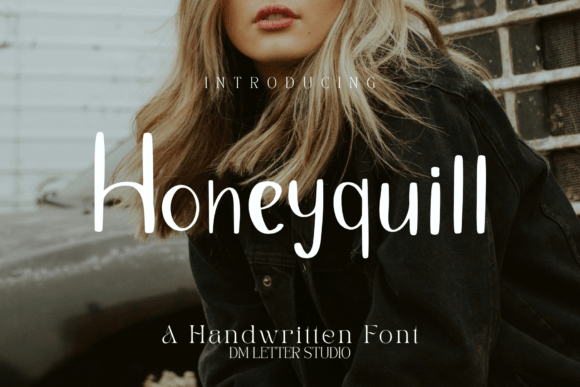
Finding a font that feels genuinely warm and personal, without sacrificing clarity or professionalism, can be a real challenge. Honeyquill steps into that space with a handwritten script style that's both sweet and functional. It's not just another script font; it's a design asset built for projects where approachability and a touch of elegance matter. The letterforms feature soft, flowing curves and smooth strokes, giving your text a friendly, organic feel that's easy on the eyes. This makes it a standout choice for headlines and short phrases where you want to inject personality without overwhelming your audience.
Where This Creative Font Truly Shines
Think of Honeyquill as your go-to for moments that call for a human touch. It excels in logo design for boutique brands, especially in the lifestyle, wedding, and artisanal food spaces. Imagine it gracing the logo of a local bakery, a candle company, or a cozy bed-and-breakfast. Its warmth translates beautifully to packaging design—think labels for homemade jams, soap wrappers, or gift tags. For editorial design, it brings a charming personality to magazine pull quotes, chapter titles in a cookbook, or headers in a lifestyle blog.
In the digital realm, Honeyquill is a powerhouse for social media graphics and web design accents. Use it for Instagram story headers, Pinterest pin titles, or the main headline on a landing page for a creative workshop. Its clear legibility at smaller sizes makes it surprisingly versatile for digital design elements where a script font might typically break down. For physical products, the font's smooth curves ensure crisp results with vinyl cutting, foil stamping, and letterpress, making it a reliable premium font for stationery, business cards, and branded merchandise.
Pairing Honeyquill: Creating Balance and Hierarchy
A single font rarely tells the whole story. The real magic happens in pairing. Honeyquill works exceptionally well with a clean sans serif font or a modern serif font. This combination creates a strong visual hierarchy: use Honeyquill for your main headline or brand name to draw the eye, then pair it with a straightforward sans serif for body copy or supporting information. This ensures your message remains clear and accessible while maintaining a cohesive and polished brand identity.
For example, pair it with a geometric sans serif for a modern, friendly tech startup vibe, or with a elegant serif for a high-end bridal suite. This font pairing strategy prevents your design from feeling cluttered and guides the viewer's attention effectively. When testing, always check the spacing. Since Honeyquill is tuned for headlines, it often needs less kerning adjustment in display contexts, speeding up your workflow in tools like Canva, Photoshop, or Illustrator.
Making It Work for Your Project
Before you commit, consider the specific needs of your project. Honeyquill is a display font at its core, meaning it's optimized for impact at larger sizes. While it's remarkably readable for a handwritten font, it's not designed for long blocks of body text. Use it strategically for short, impactful phrases: "Sweet Home," a couple's names, a product tagline, or a call-to-action button.
Evaluate the included styles. Does it come with alternates or swashes? These can add extra flair to your designs. For commercial projects, always verify the licensing to ensure it covers your intended use, whether for client work, merchandise, or digital products. To see if it's the right fit, mock up a quick headline in your design software. Test it with your chosen color stories—like honey and cream for a warm feel or sage and ivory for a natural look—to see how the personality aligns with your project's mood.
Ultimately, Honeyquill is more than just a creative font; it's a tool for building connection. It helps craft brands feel more approachable, makes marketing materials more engaging, and adds a layer of crafted sincerity to any design. By understanding its strengths in short-form display use and leveraging smart font pairings, you can integrate it seamlessly into your toolkit for projects that need to feel both personal and professional.